In distributed system architectures, synchronous HTTP REST requests between microservices introduce tight coupling, cascading failures, and network latency bottlenecks. When Service A synchronously calls Service B, Service C, and Service D to fulfill a single user checkout, the overall system reliability degrades to the mathematical product of each service's individual availability. If one downstream dependency experiences an outage or temporary network degradation, the entire checkout pipeline collapses.
Event-Driven Architecture (EDA) breaks this synchronous fragility by decoupling message producers from message consumers through asynchronous event brokers. However, choosing the wrong event broker or misunderstanding its concurrency and delivery guarantees often leads to catastrophic data inconsistencies, message loss, out-of-order processing, and poison-message infinite loops.

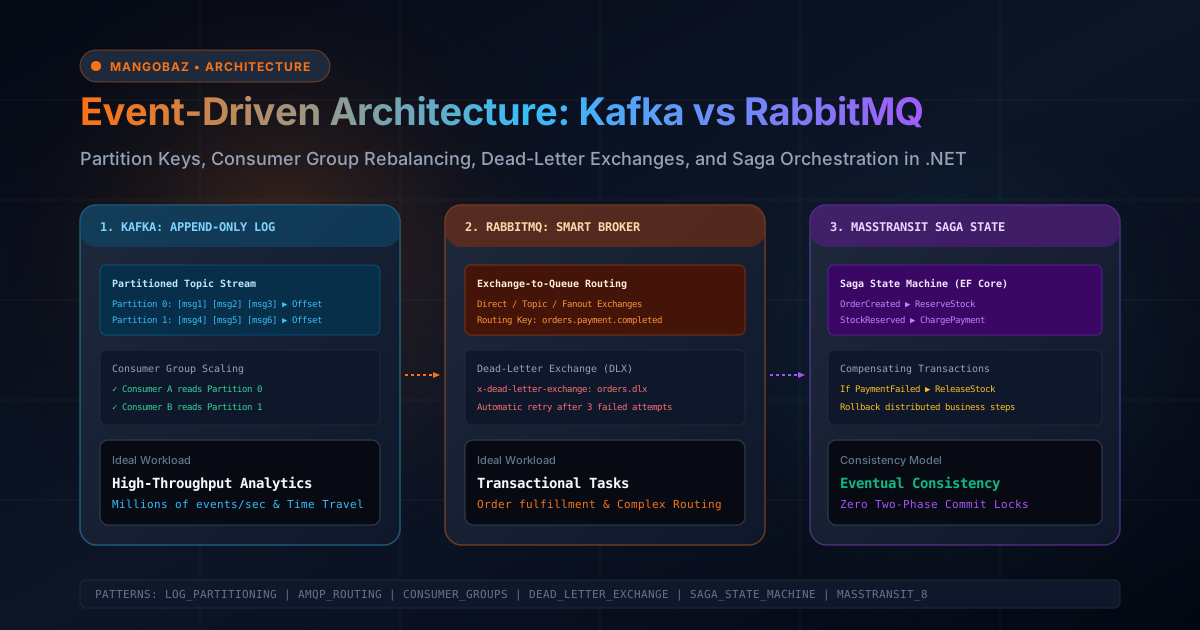
The two dominant open-source message systems in enterprise engineering are Apache Kafka and RabbitMQ. While both facilitate asynchronous communication, they are built on fundamentally different architectural models: Kafka is a distributed, append-only, replayable commit log, whereas RabbitMQ is a smart AMQP message broker with dynamic routing exchanges and ephemeral queues. In this engineering guide, we will analyze the internal mechanics of both platforms and implement production-ready C# and .NET 9 patterns for partition management, consumer group rebalancing, dead-letter exchanges, and distributed saga state machines.
---1. Core Architectural Models: Smart Broker vs Distributed Commit Log
The fundamental distinction between RabbitMQ and Apache Kafka lies in message ownership and lifecycle management:
RabbitMQ: Smart Broker, Dumb Consumer
- Routing Engine: Producers publish messages to Exchanges. Exchanges inspect message headers and routing keys, matching them against binding rules to deliver copies into zero, one, or multiple Queues.
- Message Deletion on Acknowledgment: Queues store messages in memory (or paged to disk under pressure). Once an authorized worker consumes a message and transmits an explicit
BasicAck, RabbitMQ removes the message from the queue immediately. - State Location: The broker tracks message state, delivery attempts, and consumer acknowledgments. The consumer remains relatively simple.
- Replay Capability: None. Once a message is acknowledged and deleted, it cannot be re-read by a new consumer.
Apache Kafka: Dumb Broker, Smart Consumer
- Append-Only Log: A Kafka topic is partitioned across cluster nodes. Each partition is an immutable, ordered sequence of records persistently written to disk as segment files.
- Zero Message Deletion on Consumption: Consuming a message does not delete it. Messages persist according to retention policies (e.g., 7 days or 100 GB) regardless of whether they have been consumed 0 times or 100 times.
- State Location: The consumer tracks its own read position via an integer called the Offset. A consumer group periodically commits its current offset back to an internal Kafka topic named
__consumer_offsets. - Replay Capability: Complete and native. Any consumer group can reset its offset back to zero (or any specific timestamp) to re-process historical events from hours, days, or months ago.
2. Apache Kafka Internals: Partitioning and Consumer Groups in C#
In Kafka, partitions are the unit of horizontal scalability and strict ordering. A topic with 12 partitions can be read concurrently by up to 12 consumer instances in the same consumer group. If you spin up a 13th consumer instance, it will sit completely idle, waiting for a partition rebalance.
Murmur2 Partition Hashing and Message Ordering
Kafka guarantees message ordering only within a single partition, never across multiple partitions of the same topic. When a producer publishes a record, Kafka hashes the message key using the Murmur2 algorithm to select the target partition:
PartitionIndex = Math.Abs(Murmur2Hash(MessageKey)) % NumberOfPartitionsTo guarantee that all events for a specific business entity (such as OrderCreated, PaymentCaptured, and OrderShipped for OrderId = 98124) are processed in strict sequential order, you must set the business entity ID as the message key. Messages with identical keys will consistently hash to the exact same partition.
Production-Grade Kafka Producer in .NET
Here is an enterprise-grade Kafka producer implemented in C# using Confluent.Kafka. It enforces idempotent delivery, prevents duplicate writes on network retry, and enables Zstandard compression:
using System.Text.Json;
using Confluent.Kafka;
using Microsoft.Extensions.Logging;

public record OrderEvent(Guid OrderId, Guid CustomerId, decimal Amount, string Status, DateTime Timestamp);

public class KafkaOrderProducer : IDisposable
{
    private readonly IProducer<string, string> _producer;
    private readonly ILogger<KafkaOrderProducer> _logger;
    private const string TopicName = "orders.events.v1";

    public KafkaOrderProducer(string bootstrapServers, ILogger<KafkaOrderProducer> logger)
    {
        _logger = logger;

        var config = new ProducerConfig
        {
            BootstrapServers = bootstrapServers,
            // 1. Idempotence guarantees exactly-once delivery from producer to partition
            EnableIdempotence = true,
            Acks = Acks.All, // Wait for all in-sync replicas (ISR) to persist the message
            MessageSendMaxRetries = int.MaxValue,
            MaxInFlight = 5, // Safe with EnableIdempotence=true to prevent message reordering

            // 2. High-throughput batching and compression
            LingerMs = 20, // Wait up to 20ms to batch records together
            BatchSize = 64 * 1024, // 64 KB batch buffer
            CompressionType = CompressionType.Zstd, // Fastest compression with highest ratio

            // 3. Timeouts and retries
            RequestTimeoutMs = 15000,
            MessageTimeoutMs = 30000
        };

        _producer = new ProducerBuilder<string, string>(config)
            .SetErrorHandler((_, e) => _logger.LogError("Kafka Producer Error: {Reason}", e.Reason))
            .Build();
    }

    public async Task PublishOrderEventAsync(OrderEvent orderEvent, CancellationToken ct = default)
    {
        var messageKey = orderEvent.OrderId.ToString();
        var messagePayload = JsonSerializer.Serialize(orderEvent);

        var message = new Message<string, string>
        {
            Key = messageKey,
            Value = messagePayload,
            Headers = new Headers
            {
                { "traceparent", System.Text.Encoding.UTF8.GetBytes(System.Diagnostics.Activity.Current?.Id ?? "") },
                { "schema-version", System.Text.Encoding.UTF8.GetBytes("1.0") }
            }
        };

        try
        {
            var deliveryReport = await _producer.ProduceAsync(TopicName, message, ct);
            _logger.LogInformation("Published event {OrderId} to Partition {Partition} at Offset {Offset}",
                orderEvent.OrderId, deliveryReport.Partition.Value, deliveryReport.Offset.Value);
        }
        catch (ProduceException<string, string> ex)
        {
            _logger.LogError(ex, "Failed to deliver event {OrderId}. ErrorCode: {Code}",
                orderEvent.OrderId, ex.Error.Code);
            throw;
        }
    }

    public void Dispose()
    {
        _producer.Flush(TimeSpan.FromSeconds(10));
        _producer.Dispose();
    }
}
Consumer Group Rebalancing & Manual Offset Commit
When multiple consumer instances run under the same GroupId, Kafka distributes partitions among them. Historically, Kafka used the Eager Rebalance Protocol, which revoked all partitions from all consumers during any instance restart or auto-scale event, halting all processing across the cluster (a "stop-the-world" rebalance).
In modern Kafka and .NET, always configure PartitionAssignmentStrategy = PartitionAssignmentStrategy.CooperativeSticky. Cooperative rebalancing revokes only the specific partitions that need to be reassigned, allowing unaffected consumers to continue streaming without interruption.
using Confluent.Kafka;
using Microsoft.Extensions.Hosting;
using Microsoft.Extensions.Logging;

public class KafkaOrderConsumerWorker : BackgroundService
{
    private readonly ILogger<KafkaOrderConsumerWorker> _logger;
    private readonly ConsumerConfig _config;
    private const string TopicName = "orders.events.v1";

    public KafkaOrderConsumerWorker(string bootstrapServers, ILogger<KafkaOrderConsumerWorker> logger)
    {
        _logger = logger;
        _config = new ConsumerConfig
        {
            BootstrapServers = bootstrapServers,
            GroupId = "billing-service-v1",
            AutoOffsetReset = AutoOffsetReset.Earliest,

            // CRITICAL: Disable auto-commit to prevent data loss on consumer crash
            EnableAutoCommit = false,

            // Cooperative Sticky protocol eliminates stop-the-world rebalance storms
            PartitionAssignmentStrategy = PartitionAssignmentStrategy.CooperativeSticky,

            SessionTimeoutMs = 45000,
            HeartbeatIntervalMs = 15000,
            MaxPollIntervalMs = 300000 // 5 minutes to process batch before marking consumer dead
        };
    }

    protected override async Task ExecuteAsync(CancellationToken stoppingToken)
    {
        await Task.Yield();

        using var consumer = new ConsumerBuilder<string, string>(_config)
            .SetPartitionsAssignedHandler((c, partitions) =>
            {
                _logger.LogInformation("Partitions assigned: [{Partitions}]", string.Join(", ", partitions));
            })
            .SetPartitionsRevokedHandler((c, partitions) =>
            {
                _logger.LogWarning("Partitions revoked: [{Partitions}]", string.Join(", ", partitions));
            })
            .Build();

        consumer.Subscribe(TopicName);

        try
        {
            while (!stoppingToken.IsCancellationRequested)
            {
                try
                {
                    // Block with cancellation token support
                    var consumeResult = consumer.Consume(stoppingToken);
                    if (consumeResult?.Message == null) continue;

                    // 1. Process business logic
                    await ProcessOrderAsync(consumeResult.Message.Key, consumeResult.Message.Value, stoppingToken);

                    // 2. Commit offset only AFTER successful business processing
                    consumer.Commit(consumeResult);
                }
                catch (ConsumeException ex)
                {
                    _logger.LogError(ex, "Consume error occurred: {Reason}", ex.Error.Reason);
                }
            }
        }
        catch (OperationCanceledException)
        {
            _logger.LogInformation("Kafka consumer worker stopping gracefully...");
        }
        finally
        {
            consumer.Close(); // Commits final offsets and notifies coordinator to trigger fast rebalance
        }
    }

    private async Task ProcessOrderAsync(string key, string jsonPayload, CancellationToken ct)
    {
        // Execute business logic with idempotency check in SQL database
        await Task.Delay(10, ct);
    }
}3. RabbitMQ Internals: Dead-Letter Exchanges and Poison Messages
While Kafka organizes messages into partitions, RabbitMQ relies on the AMQP (Advanced Message Queuing Protocol) topology. A message published to an exchange is routed to bound queues based on its routing key:
- Direct Exchange: Routes messages to queues where the binding key matches the routing key exactly (e.g.,
order.created). - Topic Exchange: Routes messages using wildcards (
*matches exactly one word;#matches zero or more words, e.g.,order.*.europe). - Fanout Exchange: Ignores routing keys and broadcasts messages to every bound queue simultaneously.
The Dead-Letter Exchange (DLX) Architecture
When an unhandled exception occurs in a consumer (e.g., a corrupted JSON payload or a malformed database record), simply rejecting the message with BasicNack(requeue: true) causes the message to immediately re-enter the front of the queue, triggering an infinite processing loop that consumes 100% CPU and floods error logs.
The enterprise solution is the Dead-Letter Exchange (DLX) pattern:
- The worker queue is configured with arguments:
x-dead-letter-exchange = "orders.dlx"andx-dead-letter-routing-key = "orders.poison". - When a message repeatedly fails or is rejected with
BasicNack(requeue: false), RabbitMQ automatically re-routes the message toorders.dlx. - The DLX forwards the message into an isolated Dead-Letter Queue (DLQ) for inspection, alerting via Sentry or Datadog, or delayed retry.
Production-Grade RabbitMQ C# Implementation (.NET 9 / RabbitMQ.Client 7.0)
The official RabbitMQ.Client library in version 7.0 introduces a modern, fully asynchronous API (replacing legacy synchronous blocking methods). Here is how to configure a DLX-protected topology and resilient consumer:
using System.Text;
using System.Text.Json;
using Microsoft.Extensions.Hosting;
using Microsoft.Extensions.Logging;
using RabbitMQ.Client;
using RabbitMQ.Client.Events;

public class RabbitMqOrderConsumer : BackgroundService
{
    private readonly ILogger<RabbitMqOrderConsumer> _logger;
    private readonly ConnectionFactory _factory;
    private IConnection? _connection;
    private IChannel? _channel;

    private const string MainExchange = "orders.topic.exchange";
    private const string MainQueue = "orders.processing.queue";
    private const string DlxExchange = "orders.dlx.exchange";
    private const string DlqQueue = "orders.poison.dlq";

    public RabbitMqOrderConsumer(string hostname, ILogger<RabbitMqOrderConsumer> logger)
    {
        _logger = logger;
        _factory = new ConnectionFactory
        {
            HostName = hostname,
            AutomaticRecoveryEnabled = true,
            NetworkRecoveryInterval = TimeSpan.FromSeconds(10)
        };
    }

    protected override async Task ExecuteAsync(CancellationToken stoppingToken)
    {
        _connection = await _factory.CreateConnectionAsync(stoppingToken);
        _channel = await _connection.CreateChannelAsync(cancellationToken: stoppingToken);

        // 1. Declare the Dead-Letter Infrastructure
        await _channel.ExchangeDeclareAsync(DlxExchange, ExchangeType.Direct, durable: true, cancellationToken: stoppingToken);
        await _channel.QueueDeclareAsync(DlqQueue, durable: true, exclusive: false, autoDelete: false, cancellationToken: stoppingToken);
        await _channel.QueueBindAsync(DlqQueue, DlxExchange, routingKey: "orders.poison", cancellationToken: stoppingToken);

        // 2. Declare the Main Exchange and Work Queue with DLX arguments
        await _channel.ExchangeDeclareAsync(MainExchange, ExchangeType.Topic, durable: true, cancellationToken: stoppingToken);

        var queueArgs = new Dictionary<string, object?>
        {
            ["x-dead-letter-exchange"] = DlxExchange,
            ["x-dead-letter-routing-key"] = "orders.poison",
            ["x-max-priority"] = 10 // Enable priority queuing if needed
        };

        await _channel.QueueDeclareAsync(MainQueue, durable: true, exclusive: false, autoDelete: false, arguments: queueArgs, cancellationToken: stoppingToken);
        await _channel.QueueBindAsync(MainQueue, MainExchange, routingKey: "order.*", cancellationToken: stoppingToken);

        // 3. Configure Prefetch Count (Fair Dispatch)
        // Prevents a single worker from buffering 10,000 messages while other workers remain idle
        await _channel.BasicQosAsync(prefetchSize: 0, prefetchCount: 20, global: false, cancellationToken: stoppingToken);

        var consumer = new AsyncEventingBasicConsumer(_channel);
        consumer.ReceivedAsync += async (sender, ea) =>
        {
            var body = ea.Body.ToArray();
            var json = Encoding.UTF8.GetString(body);

            try
            {
                // Process the order
                await ProcessOrderPayloadAsync(json, stoppingToken);

                // Acknowledge message upon successful processing
                await _channel.BasicAckAsync(ea.DeliveryTag, multiple: false);
            }
            catch (Exception ex)
            {
                _logger.LogError(ex, "Processing failed for DeliveryTag {Tag}. Routing to DLQ.", ea.DeliveryTag);

                // Reject with requeue=false: RabbitMQ automatically forwards to DLX
                await _channel.BasicNackAsync(ea.DeliveryTag, multiple: false, requeue: false);
            }
        };

        await _channel.BasicConsumeAsync(MainQueue, autoAck: false, consumer: consumer, cancellationToken: stoppingToken);

        // Keep running until cancellation requested
        await Task.Delay(Timeout.Infinite, stoppingToken).ConfigureAwait(ConfigureAwaitOptions.SuppressThrowing);
    }

    private async Task ProcessOrderPayloadAsync(string json, CancellationToken ct)
    {
        // Example validation error simulation
        if (json.Contains("invalid"))
            throw new FormatException("Payload schema corrupted.");

        await Task.CompletedTask;
    }

    public override async Task StopAsync(CancellationToken cancellationToken)
    {
        if (_channel != null) await _channel.CloseAsync(cancellationToken);
        if (_connection != null) await _connection.CloseAsync(cancellationToken);
        await base.StopAsync(cancellationToken);
    }
}4. Distributed Transactions: MassTransit Saga State Machines
In a microservices ecosystem, transactions cannot span database boundaries with traditional two-phase commit (2PC) without introducing severe distributed locks. The industry standard solution is the Saga Pattern, where a long-running business transaction is decomposed into a series of local transactions coordinated by asynchronous messages.
When any step fails, the Saga executes Compensating Transactions in reverse order to restore data consistency (e.g., if inventory reservation fails after payment capture, the saga automatically triggers a payment refund command).
MassTransit State Machine Saga Example
MassTransit provides a battle-tested state machine engine (Automatonymous) for both RabbitMQ and Kafka. Here is how an Order Checkout Saga is defined:
using MassTransit;

// Saga State Entity persisted to SQL Server or MongoDB
public class OrderSagaInstance : SagaStateMachineInstance
{
    public Guid CorrelationId { get; set; }
    public string CurrentState { get; set; } = string.Empty;
    public decimal OrderTotal { get; set; }
    public Guid CustomerId { get; set; }
    public DateTime CreatedAt { get; set; }
}

// Saga Events
public record OrderSubmittedEvent(Guid OrderId, Guid CustomerId, decimal Total);
public record PaymentApprovedEvent(Guid OrderId);
public record PaymentFailedEvent(Guid OrderId, string Reason);
public record InventoryReservedEvent(Guid OrderId);
public record InventoryDepletedEvent(Guid OrderId);

// Commands
public record RefundPaymentCommand(Guid OrderId, decimal Amount);

public class OrderStateMachine : MassTransitStateMachine<OrderSagaInstance>
{
    public State Submitted { get; private set; } = null!;
    public State Paid { get; private set; } = null!;
    public State Completed { get; private set; } = null!;
    public State Faulted { get; private set; } = null!;

    public Event<OrderSubmittedEvent> OrderSubmitted { get; private set; } = null!;
    public Event<PaymentApprovedEvent> PaymentApproved { get; private set; } = null!;
    public Event<PaymentFailedEvent> PaymentFailed { get; private set; } = null!;
    public Event<InventoryReservedEvent> InventoryReserved { get; private set; } = null!;
    public Event<InventoryDepletedEvent> InventoryDepleted { get; private set; } = null!;

    public OrderStateMachine()
    {
        InstanceState(x => x.CurrentState);

        // Correlate incoming events by OrderId
        Event(() => OrderSubmitted, x => x.CorrelateById(m => m.Message.OrderId));
        Event(() => PaymentApproved, x => x.CorrelateById(m => m.Message.OrderId));
        Event(() => PaymentFailed, x => x.CorrelateById(m => m.Message.OrderId));
        Event(() => InventoryReserved, x => x.CorrelateById(m => m.Message.OrderId));
        Event(() => InventoryDepleted, x => x.CorrelateById(m => m.Message.OrderId));

        // 1. Initial Step: Order Submitted
        Initially(
            When(OrderSubmitted)
                .Then(context =>
                {
                    context.Saga.CustomerId = context.Message.CustomerId;
                    context.Saga.OrderTotal = context.Message.Total;
                    context.Saga.CreatedAt = DateTime.UtcNow;
                })
                .TransitionTo(Submitted)
        );

        // 2. Payment Succeeded: Wait for inventory
        During(Submitted,
            When(PaymentApproved)
                .TransitionTo(Paid),
            When(PaymentFailed)
                .TransitionTo(Faulted)
        );

        // 3. Inventory Handling
        During(Paid,
            When(InventoryReserved)
                .TransitionTo(Completed)
                .Finalize(),

            // Compensating Transaction: If inventory is depleted, refund payment!
            When(InventoryDepleted)
                .Publish(context => new RefundPaymentCommand(context.Saga.CorrelationId, context.Saga.OrderTotal))
                .TransitionTo(Faulted)
        );
    }
}5. Architectural Decision Matrix: Kafka vs RabbitMQ
Use the following comparison matrix to select the ideal message broker for your specific architectural workload:
Architectural Dimension Apache Kafka RabbitMQ Primary Abstraction Distributed, partitioned append-only commit log. Exchange-to-Queue routing broker (AMQP 0-9-1 / 1.0). Throughput Capacity Extreme: 1,000,000+ msg/sec (Zero-copy OS page cache). High: 50,000 to 120,000 msg/sec (Erlang actor model). Message Lifecycle Persistent; stored on disk for days/weeks regardless of reads. Ephemeral; deleted immediately once acknowledged by worker. Time-Travel & Replay Native: Rewind consumer offset to any past date or offset. Not supported natively; requires secondary archival store. Routing Complexity Static; topic-based routing with partition keys. Complex; Topic wildcards, headers, direct, fanout, DLX. Dead-Letter Support Manual (via custom retry/dead-letter topics). Native & Automatic (viax-dead-letter-exchange).
Consumer Scaling Unit
Limited by number of partitions in topic.
Unlimited; competing consumers scale dynamically per queue.
Ordering Guarantees
Strict per partition key (total ordering).
FIFO per queue, but disrupted if messages are nack'd or redelivered.
Ideal Use Cases
Clickstream analytics, IoT ingest, audit logging, Event Sourcing.
Transactional workflows, order checkout, email dispatch, background workers.
---
6. Production Checklist: 10 Rules for Event-Driven Systems
- Always assign business entity IDs as Kafka partition keys: Never publish critical business events with a null key unless message ordering is completely irrelevant. Setting the entity ID (e.g.
CustomerIdorOrderId) guarantees sequential processing per entity. - Never enable auto-commit in production Kafka consumers: Setting
EnableAutoCommit = truecommits offsets on a background timer regardless of whether your business logic succeeded. If the worker crashes mid-batch, uncommitted messages are permanently skipped and lost. - Use CooperativeSticky rebalance strategy: Avoid the classic Eager rebalancing storm by configuring
PartitionAssignmentStrategy.CooperativeStickyin .NET consumer configs. - Configure Dead-Letter Exchanges (DLX) on every RabbitMQ queue: Never let poisoned messages cycle indefinitely. Route failures after $N$ retries to an isolated DLQ and alert the engineering team.
- Set Fair Dispatch (Prefetch Count) in RabbitMQ: Always configure
BasicQos(prefetchCount: 20). Without prefetch limits, RabbitMQ flushes all available messages into the first connected consumer's TCP socket, starving other workers. - Ensure all event handlers are strictly idempotent: In distributed networks, network timeouts cause message redelivery. Design consumers to detect duplicate messages using a unique
EventIdstored in a database uniqueness constraint. - Pair event emission with the Transactional Outbox Pattern: Never commit a database transaction and then publish to Kafka/RabbitMQ in two separate uncoordinated steps (the Dual-Write problem). Write the event to an
OutboxEventstable inside the same DB transaction. - Enable compression on high-volume producers: Enable Zstandard (
CompressionType.Zstd) or Snappy. Compression reduces network I/O, shrinks broker disk utilization by 60–80%, and improves overall throughput. - Monitor Consumer Lag continuously: Track consumer lag (the difference between the latest partition log end offset and the consumer group's committed offset) in Prometheus. High lag indicates under-provisioned worker pools.
- Set tombstone records for Kafka log compaction: If utilizing Kafka compacted topics for state caching, publish records with the entity key and a null payload (tombstone) to signal that the key has been deleted and should be garbage collected.
Frequently Asked Questions
What causes a Kafka consumer rebalance storm and how can it be prevented?
A rebalance storm occurs when one or more consumers exceed their configured MaxPollIntervalMs (typically 300,000ms / 5 minutes) while processing a slow batch of messages or performing a long database query. Kafka's coordinator assumes the consumer has crashed, kicks it out of the group, and triggers a cluster-wide partition reassignment. When the slow consumer finishes and calls Consume() again, another rebalance is triggered. You can prevent this by decreasing MaxPollRecords, offloading long-running I/O tasks to async worker channels, and adopting the CooperativeSticky assignor.
Can RabbitMQ messages be replayed like Apache Kafka?
No. RabbitMQ is designed as an ephemeral message broker. Once a worker acknowledges a message with BasicAck, RabbitMQ purges the message from memory and disk. If you require historical replayability in RabbitMQ, you must publish a copy of the event to a long-term data store (such as Amazon S3, Azure Blob, or a secondary Kafka topic) or use RabbitMQ Streams (an append-only log plugin introduced in RabbitMQ 3.9).
What is Exactly-Once Semantics (EOS) in Apache Kafka?
Kafka supports Exactly-Once Semantics through a combination of Idempotent Producers (which assign sequence numbers and producer IDs to prevent duplicate broker writes on network retry) and the Transactional Messaging API. The transactional API allows a service to read a message from Kafka, transform it, and write the result to another Kafka topic along with consumer offsets atomically within a single transaction boundary.
What is the difference between Message Broker and Event Streaming?
A Message Broker (like RabbitMQ) focuses on task delegation and routing. Messages represent commands or discrete units of work intended to be processed and discarded. An Event Streaming platform (like Apache Kafka) captures an immutable sequence of historical facts (events) that occurred in the business domain. Consumers treat the event stream as a continuous, replayable source of truth.
How should poison messages be handled in high-throughput pipelines?
Poison messages (messages with corrupted data or schema violations that consistently crash consumers) must never be requeued infinitely. In RabbitMQ, configure a Dead-Letter Exchange (DLX) that captures messages rejected with BasicNack(requeue: false). In Kafka, wrap consumer processing in a try/catch block; if an error exceeds a retry limit (e.g. 3 attempts with exponential backoff), publish the problematic record to a dedicated orders.deadletter.v1 topic and commit the offset to allow the partition to advance.