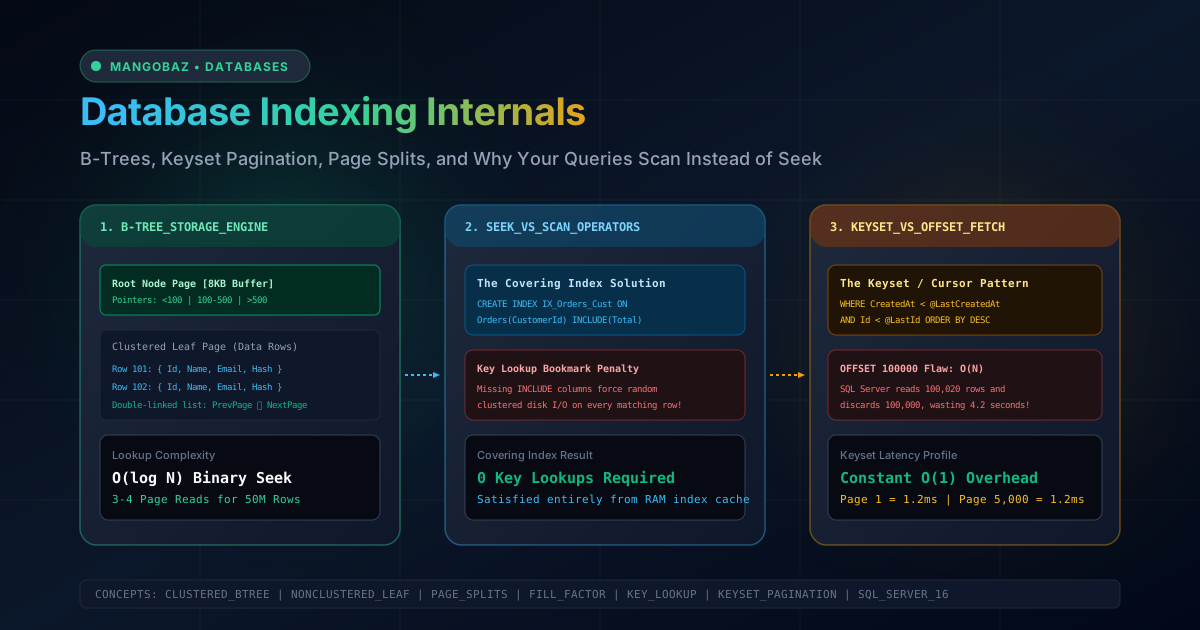
In the early days of building an application, relational databases feel like magic. You define tables, insert a few thousand rows, write a few SELECT * FROM Orders WHERE CustomerId = 42 queries, and responses return in under 2 milliseconds. But as your business scales and tables cross 5 million, 20 million, or 100 million rows, queries that used to take milliseconds suddenly take 12 seconds, CPU usage spikes to 100%, and application connection pools exhaustively time out.
When inexperienced developers encounter slow queries, the common reaction is to panic, blame the database, and randomly add indexes on every column mentioned in the WHERE clause. But adding unoptimized indexes often makes performance worse: it slows down write operations, causes massive disk fragmentation, and fails to stop the query optimizer from executing devastating table scans.
To master database performance, you must understand what happens underneath the SQL abstraction layer. In this guide, we will explore the physical storage engine of relational databases (Microsoft SQL Server and PostgreSQL), demystify B-Tree node mechanics, analyze Index Seek vs Index Scan vs Key Lookup operators in execution plans, construct Covering Indexes with INCLUDE, and reveal why traditional OFFSET / FETCH pagination is an $O(N)$ disaster that should be replaced with Keyset Cursor Pagination.
The Physical Storage Engine: 8KB Pages & B-Trees
Relational databases do not read individual rows from disk. In SQL Server, the fundamental unit of data storage is an 8KB Page. In PostgreSQL, it is an 8KB block. Eight physically contiguous pages form an Extent (64KB). When your query requests a single row, the database engine must load the entire 8KB page containing that row into memory (the Buffer Pool).
Anatomy of a Clustered B-Tree Index
A table with a Clustered Index is physically sorted and stored on disk in the order of the clustered index key. The index is organized as a self-balancing search tree known as a B-Tree (Balanced Tree):
- Root Node: A single 8KB page at the top of the tree containing key ranges and pointers to intermediate pages.
- Intermediate Level: One or more levels of branching pages directing searches down the tree.
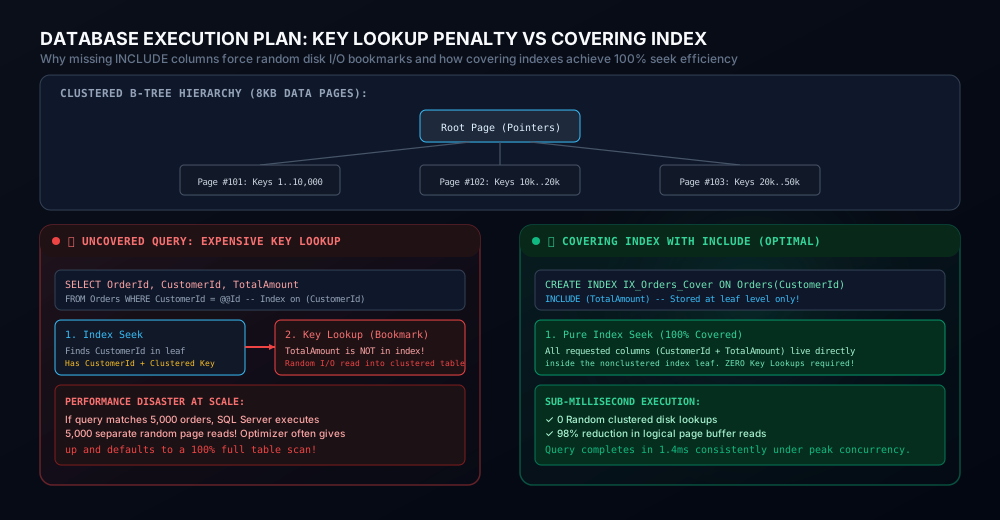
- Leaf Level: In a clustered index, the leaf level IS THE DATA TABLE ITSELF. The leaf pages contain all columns of every row, linked together as a bidirectional linked list (PrevPage ⮂ NextPage).
Because B-Trees have massive branching factors (a single 8KB intermediate page can store hundreds of key pointers), a B-Tree index on a table with 50,000,000 rows typically has a depth of only 3 or 4 levels. Searching for a row by clustered key requires only 3 or 4 page reads: Root ──▶ Intermediate ──▶ Intermediate ──▶ Leaf Page. This binary traversal runs in $O(\log N)$ time, completing in less than 0.5 milliseconds.
Clustered vs. Nonclustered Indexes & The Bookmark Penalty
A table can have only one clustered index because physical data rows can only be sorted on disk in one order (typically the primary key Id). Every additional index you create is a Nonclustered Index.
What Lives in a Nonclustered Index Leaf?
A nonclustered index is an entirely separate, secondary B-Tree structure. Unlike the clustered index, the leaf pages of a nonclustered index do NOT contain the complete data row. Instead, each nonclustered leaf entry contains only two things:
- The indexed key columns (e.g.,
CustomerId). - A row locator (or Bookmark): the Clustered Index Key (e.g.,
Id) pointing to the actual row in the clustered table.
The Key Lookup Disaster
Consider the following query executed against an Orders table with 10,000,000 rows:
SELECT OrderId, CustomerId, TotalAmount, CreatedAt
FROM Orders
WHERE CustomerId = 9812;
Suppose you have a nonclustered index defined as: CREATE INDEX IX_Orders_Cust ON Orders(CustomerId);.
When the query engine executes this query:
- It traverses the
IX_Orders_CustB-Tree (Index Seek) to locate all rows whereCustomerId = 9812. - For each matching row, it finds the
CustomerIdand the clustered keyOrderId. - THE PROBLEM: The query also requested
TotalAmountandCreatedAt, but those columns are not in the nonclustered index! - To fetch the missing columns, the engine must execute a Key Lookup (Bookmark Lookup): it jumps over to the clustered index and navigates down the clustered B-Tree to retrieve the full row!
If Customer 9812 has placed 2 orders, 2 Key Lookups take 1 millisecond. But if Customer 9812 has placed 10,000 orders, the database engine must execute 10,000 separate random I/O disk seeks! Random disk I/O is hundreds of times slower than sequential reads.
---The Tipping Point: When the query optimizer calculates that executing thousands of Key Lookups is more expensive than reading the entire table, it abandons your nonclustered index completely and defaults to a Clustered Index Scan (Full Table Scan)!
The Solution: Covering Indexes with INCLUDE
To eliminate Key Lookups entirely, you must create a Covering Index. A covering index contains 100% of the columns requested by a specific query, allowing the engine to satisfy the request directly from the nonclustered index leaf pages without ever touching the clustered data table.
In SQL Server, you achieve this using the INCLUDE clause:
-- OPTIMAL COVERING INDEX
CREATE NONCLUSTERED INDEX IX_Orders_CustomerId_Covering
ON Orders (CustomerId)
INCLUDE (TotalAmount, CreatedAt);
Why Put Columns in INCLUDE Instead of the Key?
Why not simply create INDEX IX_Orders(CustomerId, TotalAmount, CreatedAt)?
- Key Columns: Stored and sorted across all levels of the B-Tree (Root, Intermediate, Leaf). Adding large columns to the key bloats intermediate pages, decreases fanout, and increases B-Tree depth.
- INCLUDE Columns: Stored only at the leaf level. They are not sorted and do not participate in intermediate index navigation. This keeps intermediate pages compact while satisfying queries with Zero Key Lookups!
Execution Plan Operators: Seek vs. Scan
When analyzing query performance in SQL Server Management Studio (SSMS) or Azure Data Studio, you must inspect the Graphical Execution Plan. Look for these four critical operators:
Operator Efficiency Mechanics Ideal When Clustered Index Seek ⭐⭐⭐⭐⭐ Optimal Navigates directly to matching rows using B-Tree root pointers in $O(\log N)$ time. Primary key lookups (WHERE>).
Index Seek (Nonclustered)
⭐⭐⭐⭐ High
Navigates secondary B-Tree to find matching key ranges.
Selective filters with covered columns.
Key Lookup (Bookmark)
⭐⭐ Caution
Jumps from nonclustered leaf to clustered table to fetch non-indexed columns.
Queries returning very few rows (< 20).
Index Scan / Table Scan
⭐ Dangerous
Reads every single 8KB page in the entire table from beginning to end ($O(N)$).
Aggregating 100% of data; disastrous for targeted queries.
---
Pagination at Scale: Why OFFSET / FETCH Destroys Database I/O
The standard pagination pattern taught in beginner web tutorials uses OFFSET and FETCH NEXT (or LIMIT / OFFSET in MySQL/PostgreSQL):
-- DANGEROUS AT SCALE (Page 5,000)
SELECT Id, Title, CreatedAt
FROM Articles
ORDER BY CreatedAt DESC
OFFSET 100000 ROWS FETCH NEXT 20 ROWS ONLY;
The $O(N)$ Cost of Deep Paging
To return rows 100,001 through 100,020, the database engine cannot magically jump to row 100,000. It must traverse the index, read 100,020 physical rows into memory, count them, discard the first 100,000, and return the final 20!
On Page 1 (OFFSET 0), the query takes 1 millisecond. On Page 5,000 (OFFSET 100,000), the query takes 4.5 seconds and locks buffer cache pages, crippling server throughput.
The Solution: Keyset (Cursor) Pagination
In Keyset Pagination, instead of telling the database how many rows to skip, you provide the unique key values of the last record seen on the previous page:
-- KEYSET / CURSOR PAGINATION (CONSTANT O(1) LATENCY)
SELECT TOP (20) Id, Title, CreatedAt
FROM Articles
WHERE (CreatedAt < @LastCreatedAt)
OR (CreatedAt = @LastCreatedAt AND Id < @LastId)
ORDER BY CreatedAt DESC, Id DESC;
Because the database has a composite index on (CreatedAt DESC, Id DESC), it performs a single Index Seek directly to @LastCreatedAt and reads exactly 20 contiguous rows. Page 1 takes 1.2ms, and Page 10,000 takes 1.2ms! Computational complexity is reduced from $O(N)$ to constant $O(1)$.
---
Production Checklist: 10 Rules for Database Index Tuning
- Never index random GUIDs in clustered keys: Random
Guid.NewGuid() values fragment clustered B-Trees because new rows insert into random pages, causing continuous page splits. Use UUID v7 or integer/bigint identity keys.
- Cover your critical query paths with INCLUDE: Inspect your top 5 slowest API queries in APM (Datadog/Application Insights) and eliminate Key Lookups by adding queried columns to
INCLUDE.
- Keep nonclustered index keys narrow: The clustered key is implicitly appended to every nonclustered index leaf. A wide clustered key (e.g., a 100-character string) inflates the disk size of every secondary index.
- Avoid indexing low-cardinality columns: Indexing a boolean column (
IsActive) or a status with only 3 values rarely helps because the optimizer prefers a table scan over navigating a non-selective B-Tree. Use Filtered Indexes instead.
- Use Filtered Indexes for sparse conditions: In SQL Server, write
CREATE INDEX IX_Orders_Pending ON Orders(CustomerId) WHERE Status = 'Pending'; to index only active records, shrinking index size by 95%.
- Always inspect Leftmost Column order in composite indexes: A composite index on
(TenantId, CreatedAt) accelerates queries filtering on TenantId or TenantId + CreatedAt, but cannot be used for queries filtering on CreatedAt alone.
- Adopt Keyset Pagination for high-volume infinite scroll: Ban
OFFSET / FETCH on tables with more than 50,000 rows. Use cursor keys to maintain constant sub-millisecond pagination latency.
- Monitor index fragmentation and fill factor: For write-heavy tables, configure a
FILLFACTOR of 80% to 90% to provide breathing room on 8KB pages and prevent expensive page split operations.
- Never apply functions to indexed columns in WHERE clauses: Writing
WHERE YEAR(CreatedAt) = 2026 makes the query non-sargable (Search Argument Able), blinding the optimizer and forcing a full scan. Write WHERE CreatedAt >= '2026-01-01' AND CreatedAt < '2027-01-01'.
- Drop unused indexes regularly: Every index consumes disk space and incurs write overhead on
INSERT, UPDATE, and DELETE. Query sys.dm_db_index_usage_stats quarterly to identify and drop zero-read indexes.
---
Frequently Asked Questions
What is a Page Split and why is it dangerous?
An 8KB data page can hold only a fixed number of rows. When a new row needs to be inserted into a page that is already 100% full (or an existing row expands due to a column update), the database engine must allocate a new page, move approximately 50% of the rows to the new page, and update pointers in intermediate B-Tree nodes. This operation is called a Page Split. Page splits generate heavy disk I/O, write heavily to the transaction log, and cause physical fragmentation.
Can a table have multiple clustered indexes?
No. A clustered index dictates the physical sorting and storage order of rows on disk. Since data rows can physically reside in only one order, a table is restricted to exactly one clustered index. All other indexes are nonclustered secondary B-Trees that point back to the clustered row locator.
Why does SQL Server choose an Index Scan when an index exists?
The query optimizer is cost-based. If your query filters on a non-selective condition (e.g. matching 25% of the table), and the index does not cover all selected columns, executing thousands of Key Lookups is mathematically more expensive than scanning contiguous data pages sequentially. The optimizer intelligently chooses the scan to minimize total disk I/O.
What does SARGable mean in SQL query tuning?
SARGable stands for Search Argument Able. A query predicate is SARGable if the database engine can utilize an index seek directly against it. Wrapping columns in functions (e.g., UPPER(Email) = 'TEST@EXAMPLE.COM', ISNULL(Status, 0) = 1) or using leading wildcards (LIKE '%term') prevents the optimizer from evaluating B-Tree range bounds, rendering the query non-sargable and forcing a table scan.
How does Keyset Pagination handle dynamic sorting on multiple columns?
Keyset pagination supports multi-column sorting by including all sort keys in the cursor tuple and composite index. For example, sorting by Priority DESC, CreatedAt DESC, Id DESC requires comparing the composite tuple in the WHERE clause: WHERE (Priority < @LastPriority) OR (Priority = @LastPriority AND CreatedAt < @LastCreatedAt) OR (...). Most modern ORMs (such as EF Core with keyset extensions) automate this SQL generation.