Modern web engineering lives and dies by immediacy. Whether you are synchronising collaborative design canvases, streaming tokens from a generative AI model, updating high-frequency financial tickers, or building customer support chats, users no longer tolerate clicking "refresh" or waiting for artificial page reloads. In 2026, real-time interactivity is a baseline table-stake across the web platform.
Yet one of the most persistent architectural debates among backend engineers, system architects, and full-stack developers is choosing the right communication primitive: WebSockets, Server-Sent Events (SSE), or traditional HTTP Long-Polling. Too often, engineering teams default to WebSockets out of habit or hype, only to wrestle with broken proxy traversal, stateful connection scaling, load balancer connection draining, and runaway cloud bills. In other cases, teams misuse Server-Sent Events or clunky polling mechanisms where bi-directional binary framing is strictly mandatory.
In this comprehensive architectural guide, we dissect all three protocols down to the byte stream, transport layer, and TCP/HTTP framing. We examine the exact networking mechanics, evaluate connection overhead and bandwidth consumption, review real-world latency profiles, explore modern LLM token streaming paradigms, and provide production-ready code in ASP.NET Core (C#) and client-side JavaScript.
1. The Protocol Evolution: From Polling to Full-Duplex
To appreciate modern solutions, it helps to understand why each protocol emerged. In the early days of the commercial web (HTTP/1.0 and basic HTTP/1.1), the request-response model was strictly synchronous and client-initiated: the client opened a TCP connection, dispatched an HTTP request, waited for the server's response, and closed the connection.
The Polling Epoch: Short-Polling & Comet
Developers initially faked real-time updates using Short-Polling: scheduling a client timer (such as setInterval every 2 to 5 seconds) to issue repetitive GET requests. If no new events existed on the server, the server returned an empty 200 OK or 304 Not Modified.
The consequences were disastrous at scale:
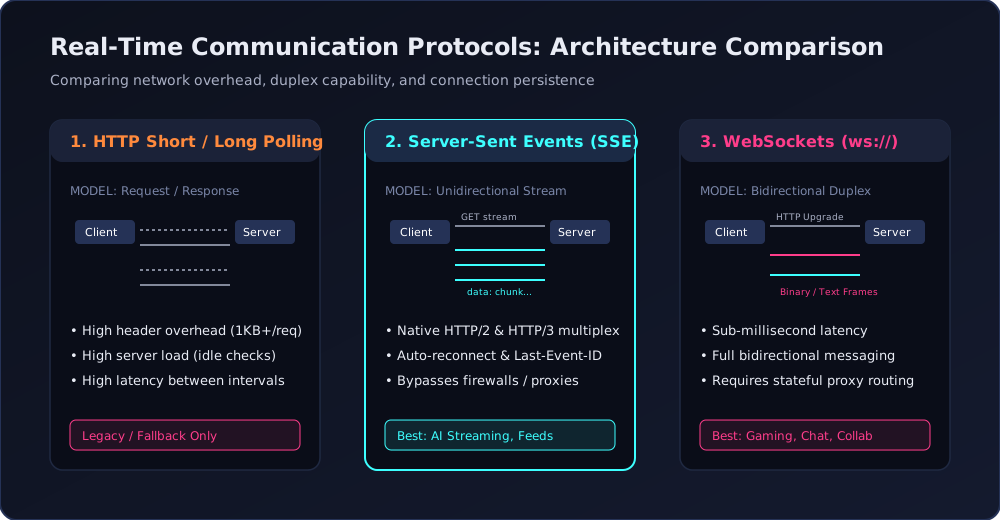
- Immense Header Overhead: An HTTP request with cookies, authentication tokens (JWTs), and user-agent headers averages 500 to 1,500 bytes. A million idle users polling every 3 seconds generate over 500 MB/s of pure ingress header garbage with zero payload content.
- TCP Handshake Churn: If persistent keep-alive connections closed or maxed out, TLS negotiation and TCP three-way handshakes consumed enormous CPU cycles on edge gateways.
- High Latency: If an event occurs 50 milliseconds after a poll completes on a 5-second interval, the user suffers an intolerable 4.95-second perceived latency.
HTTP Long-Polling
To eliminate the empty polling gap, engineers devised Long-Polling (part of the late-2000s "Comet" pattern). With long-polling, the client issues an HTTP request, but the server deliberately hangs open the request until new data arrives or a timeout (e.g., 30–60 seconds) expires. Once the server responds with data or times out, the client instantly initiates another request.
While long-polling eliminated latency gaps, it still suffered from connection reconnection storms, memory exhaustion from thousands of hanging worker threads, and head-of-line blocking under HTTP/1.1.
2. Server-Sent Events (SSE): The Lightweight Streaming Standard
Server-Sent Events (specified as part of HTML5 and formalized in RFC 8895) introduce a native, standardized browser mechanism for unilateral real-time push from server to client over standard HTTP.
How SSE Operates Under the Hood
SSE establishes a long-lived, unidirectional HTTP connection using the standard MIME type text/event-stream. The server leaves the response body open indefinitely, pushing UTF-8 formatted text chunks formatted with specific field delimiters:
HTTP/1.1 200 OK
Content-Type: text/event-stream
Cache-Control: no-cache, no-transform
Connection: keep-alive
X-Accel-Buffering: no

id: 1042
event: message
data: {"token":"synthesizing","delta_ms":14}

id: 1043
event: delta
data: {"token":" architectural","delta_ms":12}
Key Advantages of SSE
- Native Browser Auto-Reconnection: The browser's built-in
EventSourceAPI automatically handles transient connection drops, network hops, and server restarts. It automatically re-connects with exponential backoff without requiring custom application code. - Stateful Resumption via Last-Event-ID: When reconnecting,
EventSourceautomatically appends theLast-Event-IDHTTP header containing the last receivedid:field. If your backend buffers events in Redis or memory, it can backfill any missed events seamlessly. - Standard HTTP/2 and HTTP/3 Multiplexing: Under HTTP/1.1, browsers strictly limit concurrent connections to 6 per domain name, making multiple SSE tabs quickly exhaust browser sockets. Under modern HTTP/2 and HTTP/3, SSE connections exist as multiplexed logical streams over a single underlying TCP/QUIC connection. You can maintain multiple event streams simultaneously without connection starvation.
- Zero Protocol Upgrade: SSE is pure HTTP. Standard firewalls, reverse proxies, corporate VPNs, and inspection middleboxes never choke on it because there is no protocol upgrade.
- Built-in Event Demultiplexing: You can define custom event names (e.g.,
event: stockUpdateorevent: userTyping) and listen to them in the browser viaeventSource.addEventListener('stockUpdate', ...).
The Modern Generative AI Boom
If you have ever used ChatGPT, Claude, Cursor, or modern LLM completion APIs, you have interacted with SSE. Streaming token-by-token text generation is strictly unidirectional (the prompt is sent once, and tokens stream back for several seconds). Using WebSockets for LLM chat would introduce stateful cluster affinity, complex TLS termination, and handshake overhead for a task that is inherently an HTTP response stream.
3. WebSockets: The Full-Duplex Binary Standard
Defined in RFC 6455, the WebSocket protocol is an entirely independent transport layer protocol that operates over a single, long-lived TCP connection. It is designed for scenarios demanding bi-directional, high-frequency, ultra-low-latency, full-duplex communication.
The Handshake Mechanics
A WebSocket session begins life as a standard HTTP/1.1 request containing explicit upgrade headers:
GET /chat/hub HTTP/1.1
Host: api.mangobaz.com
Upgrade: websocket
Connection: Upgrade
Sec-WebSocket-Key: dGhlIHNhbXBsZSBub25jZQ==
Sec-WebSocket-Version: 13
The server validates the security key, verifies the origin, and responds with HTTP status 101 Switching Protocols:
HTTP/1.1 101 Switching Protocols
Upgrade: websocket
Connection: Upgrade
Sec-WebSocket-Accept: s3pPLMBiTxaQ9kYGzzhZRbK+xOo=
From this exact instant, the HTTP protocol is completely discarded. The underlying TCP socket transitions into a raw WebSocket framing layer.
WebSocket Frame Structure & Overhead
Unlike HTTP headers which consume hundreds of bytes on every message, WebSocket data is wrapped in lightweight binary frames. A WebSocket frame header ranges from a mere 2 to 10 bytes (depending on payload size and masking):
FINbit (1 bit): Indicates whether this frame is the final fragment of a message.Opcode(4 bits): Defines message payload type (0x1 = UTF-8 text, 0x2 = Binary data, 0x8 = Connection Close, 0x9 = Ping, 0xA = Pong).MASKbit (1 bit): Client-to-server frames are XOR-masked to prevent cache poisoning across intermediate proxies.Payload Length(7, 7+16, or 7+64 bits): Supports tiny payloads or multi-gigabyte streams.
Because WebSocket framing adds only 2 to 6 bytes of overhead per message, you can dispatch hundreds of messages per second with negligible network tax.
4. Side-by-Side Comparison Matrix
Here is an architectural comparison of the three real-time paradigms across core engineering dimensions:
Dimension HTTP Long-Polling Server-Sent Events (SSE) WebSockets Directionality Unidirectional (simulated) Unidirectional (Server to Client) Bidirectional (Full Duplex) Underlying Protocol HTTP/1.1 or HTTP/2 HTTP/1.1, HTTP/2, or HTTP/3 Custom framing over TCP / RFC 8441 Per-Message Overhead 500 – 1,500 bytes (Full HTTP headers) ~10 – 20 bytes (Stream metadata) 2 – 10 bytes (Binary frame header) Browser Connection Limit 6 per domain (HTTP/1.1) Multiplexed over single connection in HTTP/2 Independent socket per connection (~255) Auto-Reconnection Manual client loops Native browser-level (automatic backoff) Manual / Library client code required Message Types Text or JSON HTTP bodies UTF-8 Text / JSON only UTF-8 Text or Binary (ArrayBuffer/Blob) Proxy & Firewall Friendly Excellent (standard HTTP) Excellent (standard HTTP stream) Requires explicit proxy upgrade support State Complexity Stateless backend friendly Stateless backend friendly (via Redis pub) Stateful (persistent socket memory on pod)5. Implementation: Building Server-Sent Events in ASP.NET Core & JS
Let us implement a production-grade SSE endpoint in modern ASP.NET Core using C# Minimal APIs, followed by client-side consumption.
ASP.NET Core Minimal API Implementation
// Program.cs or Endpoint Route in ASP.NET Core
app.MapGet("/api/v1/metrics/stream", async (
    HttpContext httpContext,
    CancellationToken cancellationToken) =>
{
    var response = httpContext.Response;
    response.Headers.Append("Content-Type", "text/event-stream");
    response.Headers.Append("Cache-Control", "no-cache, no-transform");
    response.Headers.Append("Connection", "keep-alive");
    response.Headers.Append("X-Accel-Buffering", "no"); // Disable Nginx proxy buffering

    // Extract Last-Event-ID if client is reconnecting
    if (httpContext.Request.Headers.TryGetValue("Last-Event-ID", out var lastEventIdStr) &&
        long.TryParse(lastEventIdStr, out var lastEventId))
    {
        // Optional: Replay missed events from cache/buffer since lastEventId
    }

    long eventCounter = 0;
    while (!cancellationToken.IsCancellationRequested)
    {
        eventCounter++;
        var payload = JsonSerializer.Serialize(new
        {
            cpuUsage = Random.Shared.Next(15, 85),
            activeConnections = Random.Shared.Next(1200, 3500),
            timestamp = DateTime.UtcNow
        });

        // SSE formatting: id, event name, data payload, and empty newline delimiter
        var message = $"id: {eventCounter}\nevent: telemetry\ndata: {payload}\n\n";
        await response.WriteAsync(message, cancellationToken);
        await response.Body.FlushAsync(cancellationToken);

        // Emit every 2 seconds
        await Task.Delay(2000, cancellationToken);
    }
});
Client-Side JavaScript Consumer
// Browser client implementation with EventSource
const eventSource = new EventSource('/api/v1/metrics/stream');

// Listen to custom 'telemetry' event
eventSource.addEventListener('telemetry', (event) => {
    const telemetry = JSON.parse(event.data);
    console.log('Telemetry received (ID: ' + event.lastEventId + '):', telemetry);
    updateDashboardUI(telemetry);
});

// Built-in error handling
eventSource.onerror = (err) => {
    if (eventSource.readyState === EventSource.CONNECTING) {
        console.warn('SSE connection lost. Browser auto-reconnecting...');
    } else if (eventSource.readyState === EventSource.CLOSED) {
        console.error('SSE connection permanently closed by server.');
    }
};

// Graceful cleanup on navigation
window.addEventListener('beforeunload', () => {
    eventSource.close();
});
6. Implementation: Native WebSockets in ASP.NET Core & JS
When you need bi-directional data flow (e.g., in a multiplayer canvas, online gaming, or bidirectional device RPC), WebSockets shine.
ASP.NET Core Native WebSocket Handler
app.UseWebSockets(new WebSocketOptions
{
    KeepAliveInterval = TimeSpan.FromSeconds(30)
});

app.Map("/ws/canvas", async (HttpContext context) =>
{
    if (!context.WebSockets.IsWebSocketRequest)
    {
        context.Response.StatusCode = StatusCodes.Status400BadRequest;
        return;
    }

    using var webSocket = await context.WebSockets.AcceptWebSocketAsync();
    var buffer = new byte[1024 * 4];

    while (webSocket.State == WebSocketState.Open)
    {
        var result = await webSocket.ReceiveAsync(
            new ArraySegment<byte>(buffer),
            CancellationToken.None);

        if (result.MessageType == WebSocketMessageType.Close)
        {
            await webSocket.CloseAsync(
                WebSocketCloseStatus.NormalClosure,
                "Closed by user",
                CancellationToken.None);
            break;
        }

        // Echo or broadcast binary/text payload
        await webSocket.SendAsync(
            new ArraySegment<byte>(buffer, 0, result.Count),
            result.MessageType,
            result.EndOfMessage,
            CancellationToken.None);
    }
});
Client-Side JavaScript WebSocket Client with Heartbeats
class ResilientWebSocketClient {
    constructor(url) {
        this.url = url;
        this.socket = null;
        this.heartbeatTimer = null;
        this.connect();
    }

    connect() {
        this.socket = new WebSocket(this.url);

        this.socket.onopen = () => {
            console.log('WebSocket connection established.');
            this.startHeartbeat();
        };

        this.socket.onmessage = (event) => {
            if (event.data === '__ping__') {
                this.socket.send('__pong__');
                return;
            }
            const message = JSON.parse(event.data);
            handleIncomingMessage(message);
        };

        this.socket.onclose = (event) => {
            clearInterval(this.heartbeatTimer);
            console.warn('Socket closed. Attempting reconnect in 3s...', event.code);
            setTimeout(() => this.connect(), 3000);
        };

        this.socket.onerror = (err) => {
            console.error('Socket error encountered:', err);
            this.socket.close();
        };
    }

    startHeartbeat() {
        this.heartbeatTimer = setInterval(() => {
            if (this.socket.readyState === WebSocket.OPEN) {
                this.socket.send(JSON.stringify({ type: 'HEARTBEAT' }));
            }
        }, 25000);
    }

    send(data) {
        if (this.socket.readyState === WebSocket.OPEN) {
            this.socket.send(JSON.stringify(data));
        }
    }
}
7. Production Infrastructure & Scale Gotchas
Running real-time systems in production involves operational challenges that never appear on localhost:
Reverse Proxy Buffering (Nginx, IIS, Cloudflare)
By default, reverse proxies buffer HTTP responses to optimize packet delivery. When streaming SSE or WebSocket handshakes:
- In Nginx, you must set
proxy_buffering off;and ensureproxy_read_timeout 3600s;to prevent Nginx from severing idle connections after 60 seconds. Also addproxy_set_header Connection ''for HTTP/1.1 keep-alive. - In IIS (Internet Information Services), ensure the WebSocket module is installed via Server Manager (
Web-WebSocketsfeature). For SSE, ensure response buffering is disabled viaResponse.BufferOutput = false;. - Under Cloudflare, free plans enforce a strict 100-second HTTP timeout unless periodic comment keep-alives (
: ping\n\n) are transmitted over SSE streams.
Horizontal Scaling with Redis Pub/Sub
When you scale your application to multiple container pods or virtual machines behind a load balancer, User A connected to Pod 1 cannot receive an event triggered by User B connected to Pod 2. Both WebSockets and SSE require a shared backplane — typically Redis Pub/Sub, RabbitMQ, or managed services like Azure Web PubSub or AWS API Gateway WebSockets.
8. Decision Guide: What Should You Pick in 2026?
Here is our pragmatic engineering rule of thumb:
- Choose Server-Sent Events (SSE) if:
- Your data flow is predominantly one-way (Server-to-Client) — e.g., LLM generation streams, notifications, financial stock feeds, live system metrics, sports score tickers.
- You want native, zero-effort reconnection resilience with
Last-Event-IDreplay support. - You operate over HTTP/2 or HTTP/3 and want zero firewall or proxy traversal friction.
- Choose WebSockets if:
- You require continuous bi-directional messaging with sub-10ms response latency — e.g., collaborative whiteboards (Figma-style), multiplayer web gaming, interactive VoIP/audio streaming, financial trading order execution.
- You need high-volume binary payload transmission (e.g., Protobuf, MessagePack, audio codecs).
- Choose Long-Polling ONLY if:
- You must support legacy embedded hardware, ultra-restrictive enterprise intranet environments that block all streaming protocols, or as a temporary emergency fallback.
Frequently Asked Questions
Can Server-Sent Events send binary data?
No. The SSE specification strictly mandates UTF-8 text encoding. If you must send binary data over SSE, you have to Base64-encode it (which incurs a ~33% payload size penalty) or use WebSockets instead.
Does Server-Sent Events work behind corporate firewalls?
Yes, exceptionally well. Because SSE is standard HTTP (over port 80 or 443 with standard HTTP status codes), enterprise corporate firewalls, SSL inspection appliances, and caching proxies handle it seamlessly without dropping connections or requiring administrative exemptions.
How many concurrent WebSocket connections can a single server handle?
With modern async runtimes (such as ASP.NET Core Kestrel, Node.js, or Go), a properly tuned Linux or Windows server with 16 GB of RAM can easily maintain 100,000 to 500,000 concurrent idle WebSocket connections. The limiting factors are operating system file descriptors (ulimit -n), ephemeral port allocations, and socket memory buffers (typically 2 KB to 8 KB per open connection).
Why did OpenAI choose SSE instead of WebSockets for ChatGPT?
ChatGPT's text streaming is fundamentally a single HTTP request ("Here is my conversation prompt") followed by a progressive, unidirectional response stream ("Here are the generated tokens"). SSE fits the native HTTP request-response semantics perfectly, leverages standard HTTP caching and security headers, works with existing edge CDNs, and doesn't require maintaining stateful, bi-directional socket infrastructure on the inference gateway.