In modern web engineering, website performance is no longer a cosmetic design metric—it is a critical driver of business revenue, user conversion, search engine visibility, and advertising monetization. With Google's 2024 update replacing First Input Delay (FID) with Interaction to Next Paint (INP) as an official Core Web Vital ranking signal, engineering teams can no longer hide sluggish main thread performance behind fast initial page loads.
Google AdSense, Google Search, and enterprise performance benchmarks penalize websites that suffer from main thread freezes, layout instability, and delayed rendering. In this comprehensive 2026 performance guide, we dissect the internal mechanics of INP, LCP, and CLS, implement cooperative multi-task scheduling with scheduler.yield(), leverage the Speculation Rules API for instantaneous sub-millisecond page transitions, and protect assets with Sub-Resource Integrity (SRI).
 ---
---
1. Core Web Vitals in 2026: The Three Golden Metrics
Google defines Core Web Vitals as the subset of web performance metrics that measure real-world user experience across loading speed, interactivity, and visual stability:
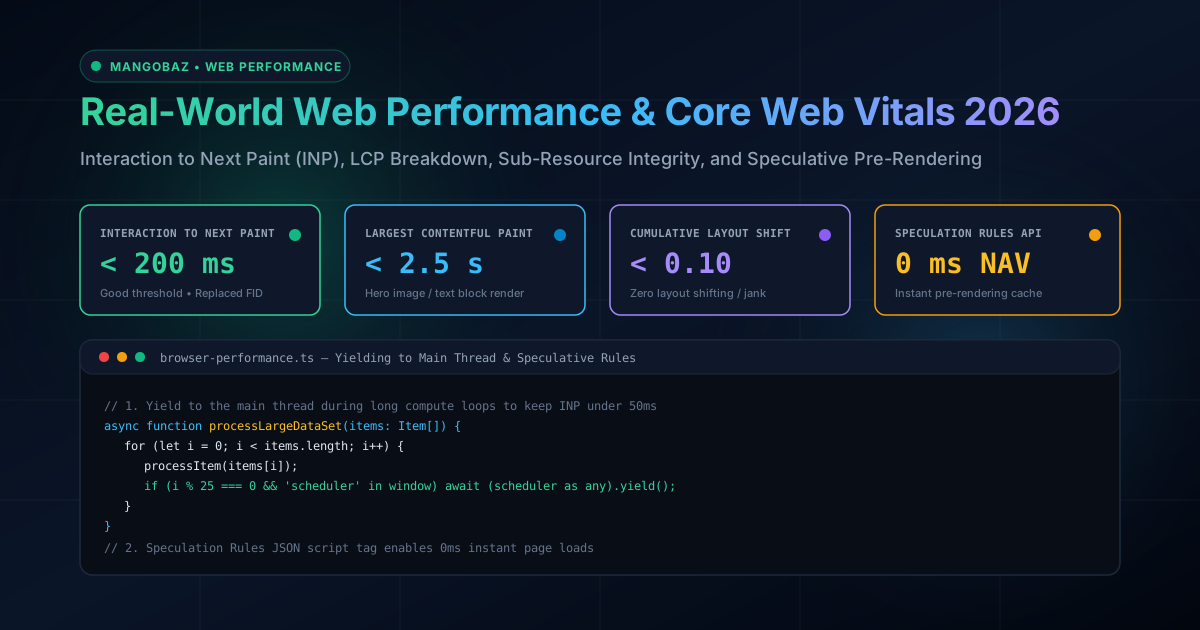
Metric Full Name Good (Pass) Needs Work Poor (Fail) What It Measures INP Interaction to Next Paint ≤ 200 ms 201 – 500 ms > 500 ms Overall page responsiveness to all clicks, taps, and keypresses. LCP Largest Contentful Paint ≤ 2.5 s 2.6 – 4.0 s > 4.0 s Perceived load speed of the largest above-the-fold content element. CLS Cumulative Layout Shift ≤ 0.10 0.11 – 0.25 > 0.25 Visual stability; unexpected movement of visible page elements. ---2. Interaction to Next Paint (INP): Why FID was Replaced
For years, Google evaluated interactivity using First Input Delay (FID). However, FID suffered from a fatal architectural flaw: it measured only the input delay of the very first user interaction while the page was loading. Once the page finished initializing, FID stopped tracking completely.
In contrast, INP monitors every single interaction (clicks, mobile taps, key presses) throughout the entire user session. It records the total latency from the moment the user interacts until the browser physically displays the resulting visual update on the screen, reporting the 98th percentile as the page score.
The Anatomy of an Interaction
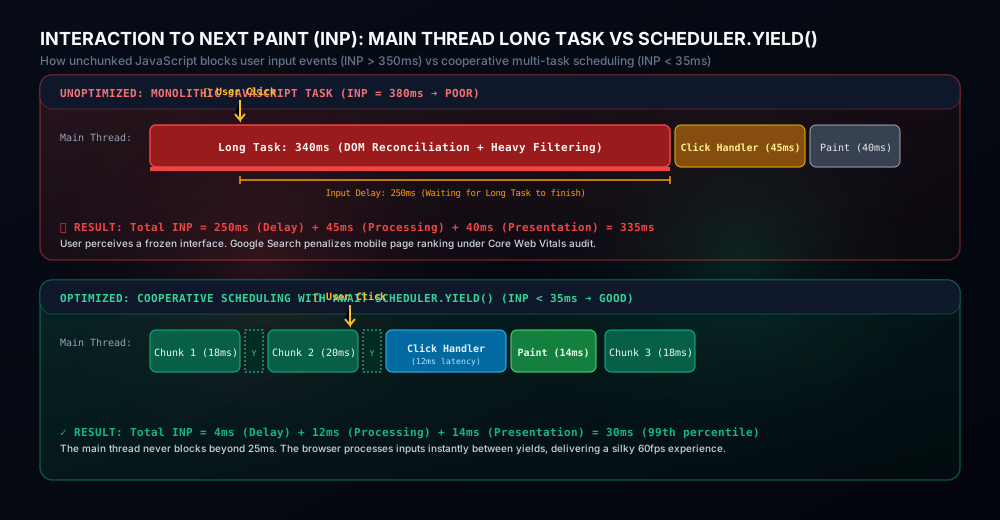
The total duration of an INP event is composed of three distinct phases:
- Input Delay: The time between user interaction and when event handlers begin executing. This delay is caused by the main thread being blocked by background JavaScript, layout computations, or garbage collection.
- Processing Duration: The total synchronous execution time of all registered event handlers (
onClick,onKeyDown, etc.). - Presentation Delay: The time required for the browser engine to calculate style recalculations, perform layout reflow, composite layers, and paint the next physical frame onto the display.
INP Duration = Input Delay + Processing Time + Presentation Delay3. Yielding to the Main Thread: scheduler.yield() vs setTimeout()
Historically, developers chunked long-running JavaScript tasks using setTimeout(fn, 0). However, setTimeout has serious drawbacks: it pushes tasks to the end of the macrotask queue, introduces an arbitrary 4ms clamp delay on nested timers, and allows unrelated background tasks to run ahead of urgent user interactions.
Modern browsers introduce scheduler.yield(), an asynchronous scheduling API that cooperatively yields control back to the browser's event loop. When you await scheduler.yield(), the browser processes any queued user inputs and renders pending frames before immediately resuming your computation:
// Production helper: cooperative scheduler with universal fallback
async function yieldToMainThread() {
    if ('scheduler' in window && 'yield' in window.scheduler) {
        return await window.scheduler.yield();
    }
    // Fallback using MessageChannel (faster than setTimeout without 4ms clamp)
    return new Promise((resolve) => {
        const channel = new MessageChannel();
        channel.port1.onmessage = () => resolve();
        channel.port2.postMessage(null);
    });
}

// Example: Processing 10,000 DOM elements without freezing the main thread
async function renderComplexList(items) {
    const container = document.getElementById('item-container');
    const start = performance.now();

    for (let i = 0; i < items.length; i++) {
        const el = document.createElement('div');
        el.className = 'list-item';
        el.textContent = `Item #${items[i].id}: ${items[i].title}`;
        container.appendChild(el);

        // Every 50 items or 16ms (one 60fps frame budget), yield to let browser paint and handle user clicks!
        if (i % 50 === 0 && performance.now() - start > 16) {
            await yieldToMainThread();
        }
    }
}
Observing Long Tasks with the Long Animation Frames (LoAF) API
Chrome 123+ replaces the legacy Long Tasks API with the Long Animation Frames (LoAF) API. LoAF provides unprecedented diagnostics into script attribution, identifying exactly which function, file, and line number caused a frame delay exceeding 50ms:
// Initialize LoAF Performance Observer in production
if ('PerformanceObserver' in window && PerformanceObserver.supportedEntryTypes.includes('long-animation-frame')) {
    const observer = new PerformanceObserver((entryList) => {
        for (const entry of entryList.getEntries()) {
            // A frame rendering that took longer than 50ms
            if (entry.duration > 50) {
                console.warn(`[LoAF Warning] Frame duration: ${entry.duration.toFixed(1)}ms. Blocking: ${entry.blockingDuration.toFixed(1)}ms`);

                for (const script of entry.scripts) {
                    console.warn(`  Source: ${script.sourceURL}:${script.sourceCharPosition} | Invoker: ${script.invoker}`);
                }
            }
        }
    });

    observer.observe({ type: 'long-animation-frame', buffered: true });
}4. Largest Contentful Paint (LCP) Engineering
LCP measures when the largest above-the-fold content element (such as a hero image, banner video, or major heading) is fully rendered on screen. A fast LCP requires optimizing four sub-parts:
- Time to First Byte (TTFB): Server response time, edge CDN routing, and HTTP/3 keep-alive. Target: < 800ms.
- Resource Load Delay: Time from TTFB until the browser discovers the LCP image URL. Target: 0ms.
- Resource Load Duration: Download time for the LCP image asset. Target: < 1000ms.
- Element Render Delay: Time from image download completion until GPU paint. Target: 0ms.
1. High-Priority Preloading with fetchpriority
Never hide your LCP hero image inside CSS background-image: url(...). CSS background images cannot be discovered by the browser's Preload Scanner until after the stylesheet is fetched and parsed, adding 400ms–800ms of unnecessary delay. Instead, use a semantic <img> tag with fetchpriority="high":
<!-- High-Priority Semantic LCP Hero Image -->
<link rel="preload" as="image" href="/images/hero-1200.avif" fetchpriority="high" type="image/avif" />

<img
    src="/images/hero-800.webp"
    srcset="/images/hero-600.avif 600w, /images/hero-1200.avif 1200w"
    sizes="(max-width: 768px) 100vw, 1200px"
    alt="Mangobaz Architecture Platform"
    width="1200"
    height="630"
    fetchpriority="high"
    decoding="async"
    />
2. Eliminating Cumulative Layout Shift (CLS)
Layout shifts occur when images, iframes, or ads load without pre-allocated dimensions, pushing existing content down the page. Always enforce aspect ratio rules in CSS or inline HTML attributes:
/* Prevent CLS on all media elements */
img, video, iframe {
    max-width: 100%;
    height: auto;
    display: block;
}

/* Reserve space for dynamic ad banners or widgets */
.ad-slot-header {
    min-height: 250px;
    background: rgba(255, 255, 255, 0.02);
    contain: layout paint;
}5. Instant Transitions: Speculation Rules API
The Speculation Rules API is a revolutionary standard designed to replace legacy <link rel="prefetch">. Instead of merely prefetching asset bytes, Speculation Rules instruct Chromium browsers to fully pre-render entire HTML pages and execute their scripts inside an invisible background tab.
When the user clicks a pre-rendered link, the background tab is instantly swapped into view, resulting in a 0 millisecond perceived navigation!
Implementing Speculation Rules in Razor Pages / HTML
Here is an enterprise speculation rules configuration that pre-renders key documentation and article links as soon as a user hovers or scrolls near them:
<script type="speculationrules">
{
  "prerender": [
    {
      "source": "list",
      "urls": [
        "/Articles",
        "/Tools",
        "/Editorial-Standards"
      ],
      "eagerness": "moderate"
    },
    {
      "source": "document",
      "where": {
        "and": [
          { "href_matches": "/Articles/Details/*" },
          { "not": { "href_matches": "*/admin/*" } }
        ]
      },
      "eagerness": "conservative"
    }
  ]
}
</script>
eagerness: "moderate": Pre-renders when the user hovers over a link for more than 200 milliseconds or presses down on a pointer device.eagerness: "conservative": Pre-renders on mouse down or touch start, ensuring zero wasted bandwidth for casual mouse movements.
6. Security & Performance: Sub-Resource Integrity (SRI)
When loading third-party scripts, fonts, or libraries from Content Delivery Networks (CDNs), your website is vulnerable to supply chain attacks. If the CDN server is compromised, an attacker can inject malicious cryptocurrency miners, keystroke loggers, or phishing payloads directly into your users' browsers.
Sub-Resource Integrity (SRI) guarantees that browsers execute only assets whose cryptographic hash matches your pre-defined checksum:
<!-- Sub-Resource Integrity (SRI) SHA-384 Verification -->
<link
    rel="stylesheet"
    href="https://cdnjs.cloudflare.com/ajax/libs/prism/1.29.0/themes/prism-tomorrow.min.css"
    integrity="sha384-56x8vIqY12O0k8/Wq0hO9hZp18E7aK+7qWcE5YlO2P3b7v8c7d9e1f2a3b4c5d6e"
    crossorigin="anonymous" />

<script
    src="https://cdnjs.cloudflare.com/ajax/libs/prism/1.29.0/prism.min.js"
    integrity="sha384-5f5k5k5..."
    crossorigin="anonymous"
    defer>
</script>7. Production Checklist: 10 Rules for Web Performance in 2026
- Never execute tasks longer than 50ms on the main thread: Audit your code with Chrome DevTools Performance panel and split long loops using
await scheduler.yield(). - Set explicit width and height on every image: Prevent CLS by supplying width, height, and CSS
aspect-ratioon all images and embeds. - Assign fetchpriority="high" to above-the-fold hero images: Ensure the browser Preload Scanner prioritizes your LCP element over non-critical scripts.
- Self-host or preconnect to critical origins: Avoid DNS lookup and SSL handshake delays on fonts and assets by adding
<link rel="preconnect" href="https://fonts.gstatic.com" crossorigin>. - Deploy modern AVIF and WebP image formats: AVIF delivers 30% smaller file sizes than WebP and 50% smaller than legacy JPEG with superior visual fidelity.
- Adopt the Speculation Rules API for instant navigation: Add pre-rendering rules for high-intent user journeys to eliminate page load latency.
- Minify and inline critical path CSS: Inline the top 10 KB of critical CSS directly in the HTML
<head>to render the initial frame without waiting for external stylesheets. - Defer all non-essential third-party scripts: Always load analytics, ads, and widgets with
deferor load them dynamically after page interactivity. - Enable Brotli / Gstandard compression: Brotli compression shrinks text payloads (HTML, CSS, JS) by 15–20% compared to legacy Gzip.
- Enforce Sub-Resource Integrity (SRI) on external CDNs: Safeguard users from supply chain compromises by verifying SHA-384 asset checksums.
Frequently Asked Questions
Why did Google replace FID with INP in Core Web Vitals?
First Input Delay (FID) only captured the input delay of the first interaction during page load. Once a user scrolled or interacted later, FID stopped measuring. Many websites had an artificial 99% pass rate on FID despite freezing and stuttering during checkout or search filtering. Interaction to Next Paint (INP) measures every single interaction throughout the full lifespan of the page, ensuring true end-to-end responsiveness.
How does scheduler.yield() differ from requestAnimationFrame()?
requestAnimationFrame() schedules a callback right before the next scheduled browser repaint (typically every 16.6ms at 60Hz). It is designed specifically for visual animations. In contrast, scheduler.yield() is designed for data-processing tasks: it pauses the current JavaScript task just long enough for the browser to process high-priority user input events and paint, and then immediately resumes execution without waiting for the next animation frame.
Does the Speculation Rules API waste user cellular data?
No, when configured properly. By using eagerness: "moderate" (which only triggers after a 200ms pointer hover) or eagerness: "conservative" (which only triggers on pointer down/touch start), speculation occurs only when there is high intent to navigate. Additionally, browsers automatically disable speculation rules when the device has 'Data Saver' mode enabled.
How does server Time to First Byte (TTFB) directly impact LCP?
Time to First Byte represents the foundational baseline for all subsequent loading metrics. If your web server takes 1.8 seconds just to render and transmit the initial HTML document, your LCP target of < 2.5 seconds leaves only 700 milliseconds for DNS resolution, SSL negotiation, CSS download, image fetching, and GPU painting. Optimizing server response times via caching, edge CDNs, and database indexing is mandatory for green Core Web Vitals.
What causes Cumulative Layout Shift (CLS) on dynamically loaded ads?
Ad networks inject display banners dynamically via JavaScript after the main page layout has already been computed. If the container element does not have a predefined reserved height (e.g. min-height: 250px), the ad suddenly expands from 0px to 250px, violently pushing the reading text downward. Reserving layout slots with CSS containment completely eliminates this shift.